Little companion.
Serious possibility.
Your agents, tools and context. Working together.
Give Mellow a responsibility. Make room for the rest of life.

One companion.
A whole team behind it.
Take action
Give agents tools, skills and working folders. Let them research, use apps and produce useful work within the access you grant.
Explore how it worksKeep context
Bring instructions, memory and knowledge into the work. Build agents around your projects instead of explaining everything again.
Explore how it worksKeep going
Set schedules and folder triggers for recurring work. Get results and exceptions while your available host handles the routine.
Explore how it worksA capable system.
A familiar little face.
Agents, context, tools and routines.
Designed to work together.
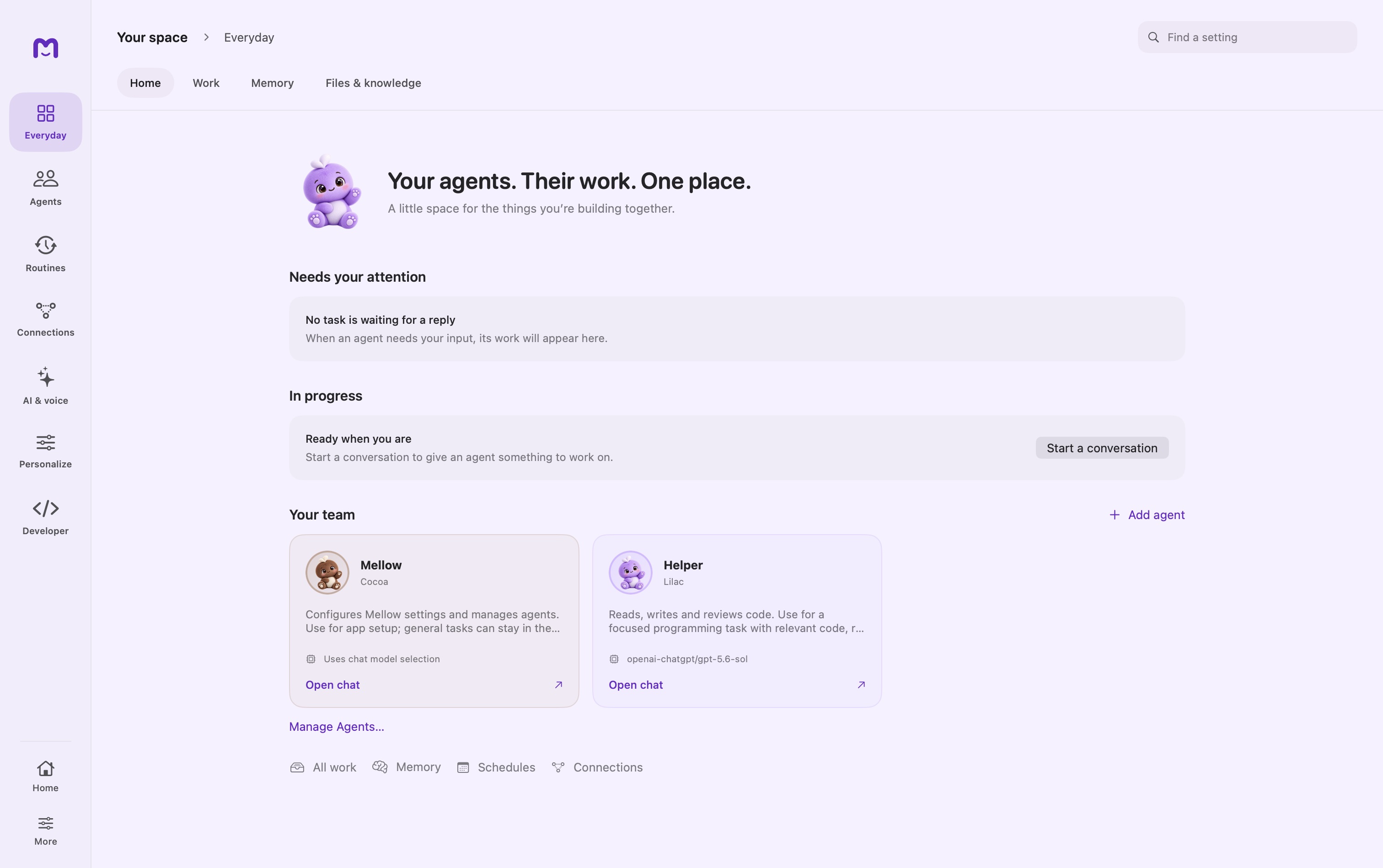
A home for every responsibility.
Give each agent a purpose, a model and the tools to do its work. Keep the team and its ongoing work in view.
Explore your teamYou have a life.
Your agents have work.
A brief before your morning. Research that returns with sources. A new file that starts the next step.
Configure the routine once. Come back to results, and the decisions that need you.
See how it worksGive it context. Leave it a responsibility.
Routine work can move without another prompt. Set the scope once, then hear about results, exceptions and useful changes.
The brief is ready before you think to ask.
A configured routine brings the new brief and prior notes together, so the next meeting starts with the changes and open questions.
A sample project brief arrives in a folder you allowed a watcher to monitor.
A knowledge collection holds the previous brief and your planning notes. The agent receives access to that collection.
A routine you configured asks the agent to compare the material before your planning session.
MellowExample notificationYour meeting brief is ready.
- What changed since the last draft
- Decisions still open
- Questions worth asking
The sample brief adds a mobile onboarding flow. The delivery date is still undecided. Ask who owns the first device-pairing test and whether the new scope changes the milestone. A real brief should link each observation to the supplied files.
Prepare a private brief. Sending it to attendees or changing an event is a separate action.
Illustrative workflow · Requires configured files, agent and schedule. All examples use sample data.
Set the direction.
Get on with your day.
A responsibility gives Mellow something to keep doing. A schedule or folder trigger gives it a reason to start.
Build your first routine- 01
Tell it what a good result looks like.
“Every weekday, prepare a brief from these project notes. Highlight changes and unanswered questions.”
- 02
Give it the context and tools.
Choose the agent, model, working folder and connected tools. Set the access it needs to carry out the job.
- 03
Come back to the outcome.
Configured runs handle permitted steps and retain their results. Check progress when you want; resolve the inputs or decisions that need you.
Little presence.
Bigger possibilities.
Your desk, your home, your everyday devices.
One connected Mellow ecosystem.

A little presence. A useful nudge.
Imagine a small desk companion that shows what your agents finished, makes room for a quick voice thought, and quietly signals when a decision needs you.
You sit down. Your project brief is already waiting.Concept: a display, microphone controls and a connection to your Mellow host.
Your agents, project context and responsibilities stay connected to the host where they run.
A pocket companion for a thought. A kitchen display for the day. Your TV for a shared plan.
The goal is continuity across devices, with clear pairing and control over what each screen can see.
Mellow Gadgets is a future direction. Hardware, device SDKs and these integrations are not available to buy or download. No release date has been announced.
A few things worth knowing.
Does Mellow work while I’m away?
Configured schedules and folder watchers can start agent work without a new chat prompt. The host must stay awake and available, with the required model, tools and permissions configured.
Where does my work run?
Local work runs on its Mac. You can connect a paired Mac or explicitly delegate to a published Cloud workspace agent available to your account. Connecting a cloud service does not move all your local work into it.
Do I have to approve every step?
Agents can carry out actions allowed by their configured permissions. Actions outside those permissions and missing inputs may need your attention. You choose the scope of each responsibility.
What can I connect?
Models, tools and MCP servers, files and knowledge, and supported messaging channels. Availability depends on your setup. The reference covers each connection and its requirements.
Explore all capabilitiesA little Mellow. A lot more possibility.
Start on your Mac. Build a team around your world.